こんにちは。
1ヶ月程前に、くしゃみASMRの動画を投稿しました。
【くしゃみASMR】至近距離くしゃみ、時々耳ふー。黒3Dio/霧月リル【sneeze ASMR】
些細なことではありますが、ASMR音声に合うような映像を作って動画化したので、その話をしようと思います。
ASMRの映像は基本見ないと思うのでどうでも良い話かもしれませんが、折角なので一応残しておきます。
あと、「くしゃみASMR」というジャンルについて思ったことも少し書いておきます。
(技術的な話に興味のない方は、その話まですっ飛ばしてください)
謝辞: 音声とイラストを提供していただいた霧月リルさんには多大な感謝を申し上げます。
映像の制作
ASMRの映像というと、静止画や、それに少しだけ効果をつけたものが多いかと思います。
今回、初めてASMR動画を出すにあたり、そのあたりを少し模索しました。
(とはいえ基本はシンプルイズベストの方針で、なるべく余計なことをしないようにしたつもりです)
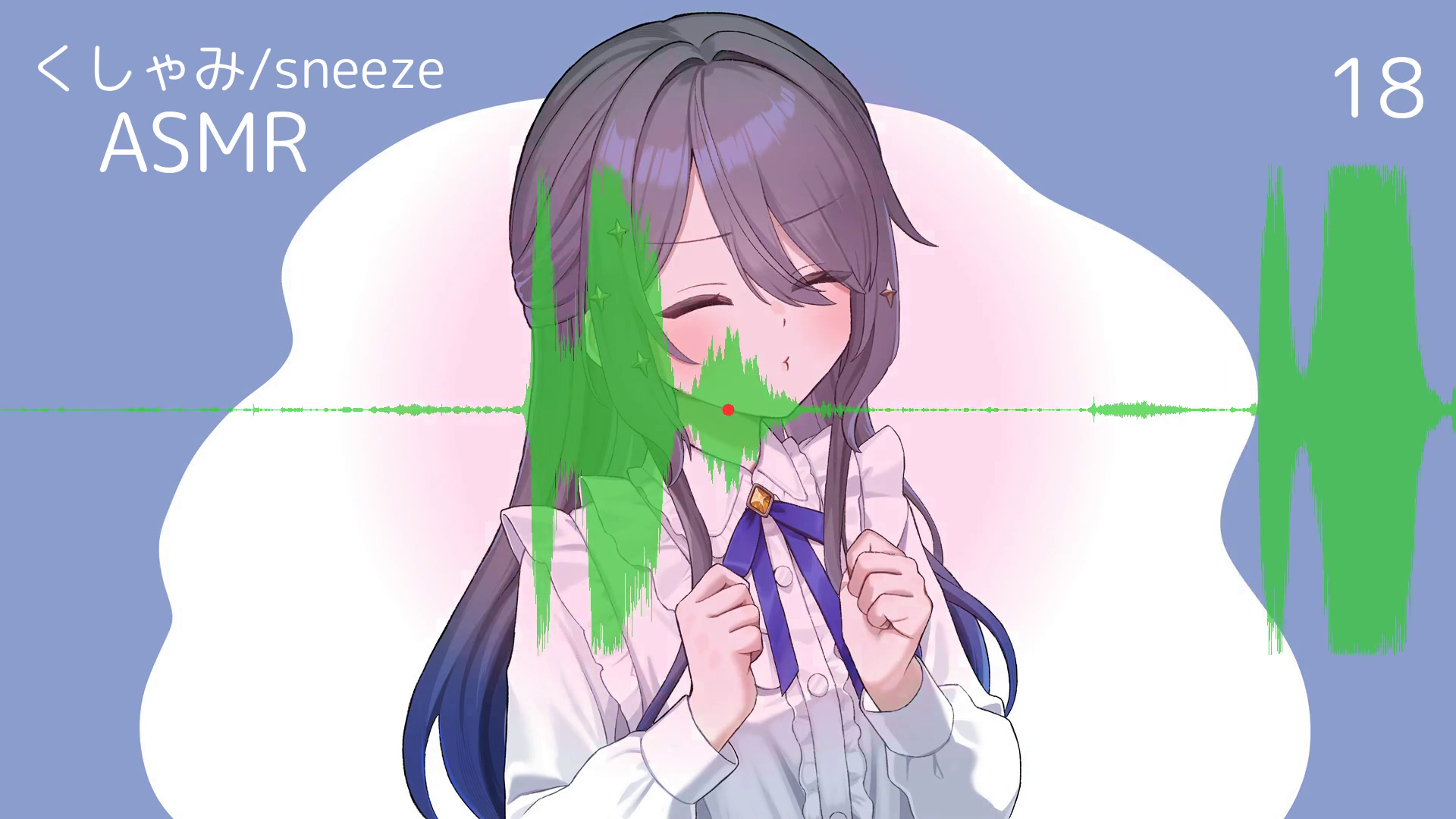
やったことは大きく分けて、以下の4点です。詳細は後述します。
- 音声波形の表示
- 音量に応じたフラッシュ効果 (工夫点複数あり)
- 背景イラストの簡単なアニメーション
- タイトルとカウンターの表示
いつものことながら、いわゆる動画編集ツールは使わず、Pythonで編集しています。
なお、コードは Gemini (GoogleのAI) と相談しながら書きました。制作期間は丁度1日(16時間程度)でした。
後で説明しますが、音量の平均値を使った振幅の平滑化や、アタック・リリースによるチカチカの軽減など、自分で辿り着くのは大変な案を出してくれました。ありがとう。
こういったプログラムは再現性があるだけでなく、AIとの親和性が高いのも魅力ですね。
では、それぞれ見ていきます。
音声波形の表示
一番分かりやすいのは、音声の可視化ですね。音声を動画として投稿するときによく用いられる手法だと思います。
音声波形をそのまま映します。現在位置が動画の中心に来るようにし、波形を右から左へ平行移動させます。
ASMRに合わせてゆったりとした演出にしたかったため、移動速度は少しゆっくりめにしました。
ただし、現在位置を動画の中心とすると、今から数秒間の音声がネタバレされることになります。ネタバレにならないように現在位置を右端にするかなど迷いましたが、基本に忠実にということでやめました。
特に今回はくしゃみASMRなので、驚きたくない人に見てもらう用途でも使えるかと。
また、背景イラストを配置している関係で、波形は半透明にしています。
コード例
import numpy as np
from moviepy import AudioFileClip, VideoClip

def create_waveform_video(audio_path, output_path):
    print(f"[{audio_path}] の読み込み中...")
    # 1. 音声ファイルの読み込み
    audio = AudioFileClip(audio_path)

    # --- パラメータ設定 ---
    fps = 30
    W, H = 1280, 720
    window_seconds = 4.0  # 画面内に表示する音声の時間(秒)。この値でスクロール速度が決まります
    pixels_per_second = W / window_seconds

    # 2. 音声データの配列化とモノラル化
    snd = audio.to_soundarray()
    if snd.ndim > 1:
        snd = snd.mean(axis=1) # ステレオの場合は平均をとってモノラルに変換

    sr = audio.fps

    print("波形データの計算中...")
    # 3. 波形の事前計算(エンベロープ抽出)
    # 現在の時刻が画面中央に来るよう、音声の前後に半画面分(window_seconds / 2)の無音をパディング
    pad_duration = window_seconds / 2
    pad_samples = int(pad_duration * sr)
    padded_snd = np.pad(snd, (pad_samples, pad_samples), 'constant')

    # 1ピクセルあたりのサンプル数を計算
    samples_per_pixel = int(sr / pixels_per_second)
    num_pixels = len(padded_snd) // samples_per_pixel
    truncated_snd = padded_snd[:num_pixels * samples_per_pixel]

    # 1ピクセルごとに最大振幅を計算して波形の輪郭(エンベロープ)を作成
    chunks = truncated_snd.reshape((num_pixels, samples_per_pixel))
    envelope = np.max(np.abs(chunks), axis=1)

    # 振幅を正規化 (0.0 〜 1.0)
    max_amp = np.max(envelope)
    if max_amp > 0:
        envelope = envelope / max_amp

    # 描画高速化のためのY座標配列を準備
    half_H = H // 2
    y_coords = np.arange(H).reshape(-1, 1)
    dist_from_center = np.abs(y_coords - half_H)

    # 4. フレーム生成関数(時刻 t ごとに呼ばれる)
    def make_frame(t):
        # 黒背景のフレームを作成
        frame = np.zeros((H, W, 3), dtype=np.uint8)

        # 時刻 t における波形の開始ピクセルインデックスを計算
        pixel_start_idx = int(t * pixels_per_second)
        pixel_end_idx = pixel_start_idx + W

        env_slice = envelope[pixel_start_idx:pixel_end_idx]
        actual_w = len(env_slice)

        if actual_w > 0:
            # 振幅をピクセルの高さに変換(最大振幅が画面高の90%になるように調整)
            bar_heights = (env_slice * half_H * 0.9).astype(int)

            # NumPyのブロードキャスト機能で描画範囲のマスクを一括作成(高速化の要)
            mask = dist_from_center <= bar_heights.reshape(1, -1)

            # 波形の色を設定 (RGB: ライトグリーン)
            frame_slice = frame[:, :actual_w]
            frame_slice[mask] = [50, 205, 50]

        # 画面中央(現在の再生時刻)に赤いシークバーを描画
        center_x = W // 2
        frame[:, center_x-1:center_x+1] = [255, 50, 50]

        return frame

    print("動画のレンダリングを開始します...")
    # 5. 動画クリップの生成と書き出し (MoviePy 2.0の記法)
    video = VideoClip(make_frame, duration=audio.duration)
    video = video.with_audio(audio) # 音声の合成
    video.write_videofile(output_path, fps=fps, codec="libx264", audio_codec="aac")
    print("完了しました!")

if __name__ == "__main__":
    create_waveform_video("voice.wav", "output.mp4")
音量に応じたフラッシュ効果
くしゃみに迫力を感じさせる効果を入れたいと思い、音量に応じてフラッシュをつけてみました。
ただ、何も考えずに入れると見づらくなってしまいます。
具体的には、音量(振幅)に比例するように画面全体に色を付けるとチカチカしてしまうため、以下の4つの工夫をしました。
フラッシュ半径の変動
フラッシュで色を付ける範囲を画面中央の円形内とし、さらに円の半径は音量に比例するようにしました。
これにより、小さな変化を感じづらくなり、チカチカがかなり解消されました。
振幅の平滑化 (スムージング・エンベロープ抽出)
生の波形をそのまま使うのではなく、一定時間ごとの音量の平均値(RMSなど)を計算して色の濃さに反映させます。
これにより、細かな波の上下が吸収されて滑らかになります。
アタックとリリースの調整 (イージング)
アタック(立ち上がり): 音が大きくなったときは瞬時に色を付けます(迫力を出すため)。
リリース(余韻): 音が小さくなったときは、数値をすぐにゼロに戻すのではなく、緩やかに下げます。これにより、自然な残響のように見えます。
閾値の導入
一定の音量を超えた大きな音が出たときだけ色を付けます。
メリハリが出るため、迫力を出したい場面を際立たせることができます。
以上、チカチカ感をなくすための工夫でした。Geminiのご神託を最大限に活用させてもらいました。
コード例
import numpy as np
from moviepy import AudioFileClip, VideoFileClip, VideoClip

def create_circle_flash_waveform(audio_path, bg_video_path, output_path):
    print(f"[{audio_path}] と [{bg_video_path}] の読み込み中...")

    audio = AudioFileClip(audio_path)
    bg_clip = VideoFileClip(bg_video_path)

    W, H = bg_clip.size
    fps = bg_clip.fps if bg_clip.fps else 30

    # --- パラメータ設定 ---
    window_seconds = 4.0
    pixels_per_second = W / window_seconds

    snd = audio.to_soundarray()
    if snd.ndim > 1:
        snd = snd.mean(axis=1)
    sr = audio.fps

    print("波形データの計算中...")
    pad_samples = int((window_seconds / 2) * sr)
    padded_snd = np.pad(snd, (pad_samples, pad_samples), 'constant')

    samples_per_pixel = int(sr / pixels_per_second)
    num_pixels = len(padded_snd) // samples_per_pixel
    truncated_snd = padded_snd[:num_pixels * samples_per_pixel]

    chunks = truncated_snd.reshape((num_pixels, samples_per_pixel))
    envelope = np.max(np.abs(chunks), axis=1)

    max_amp = np.max(envelope)
    if max_amp > 0:
        envelope = envelope / max_amp

    print("エフェクト用エンベロープの解析中...")
    samples_per_frame = int(sr / fps)
    num_frames_audio = len(snd) // samples_per_frame
    truncated_snd_for_rms = snd[:num_frames_audio * samples_per_frame]

    rms_chunks = truncated_snd_for_rms.reshape((num_frames_audio, samples_per_frame))
    rms_volume = np.sqrt(np.mean(rms_chunks**2, axis=1))

    max_rms = np.max(rms_volume)
    if max_rms > 0:
        rms_volume = rms_volume / max_rms

    flash_intensity = np.zeros_like(rms_volume)
    release_time = 0.3
    release_coeff = np.exp(-1.0 / (fps * release_time))

    current_val = 0.0
    for i in range(len(rms_volume)):
        if rms_volume[i] > current_val:
            current_val = rms_volume[i]
        else:
            current_val = current_val * release_coeff
        flash_intensity[i] = current_val

    # --- 描画準備 ---
    half_H = H // 2
    center_x = W // 2
    y_coords = np.arange(H).reshape(-1, 1)
    dist_from_center_y = np.abs(y_coords - half_H)

    wave_color = np.array([50, 205, 50])
    wave_alpha = 0.7
    pink_color = np.array([255, 105, 180])
    max_flash_alpha = 0.6

    # 【変更点】画面全体のピクセルに対する「中心からの距離」を事前計算
    Y, X = np.ogrid[:H, :W]
    dist_matrix = np.sqrt((X - center_x)**2 + (Y - half_H)**2)

    # 円の最大半径(音が最大のときにどこまで広がるか。WとHの大きい方の半分程度に設定)
    max_radius = max(W, H) // 1.5

    # 赤い点のマスクも距離マトリクスを流用して作成
    dot_radius = 8
    dot_mask = dist_matrix <= dot_radius

    # 4. フレーム生成関数
    def make_frame(t):
        bg_t = t % bg_clip.duration
        frame = bg_clip.get_frame(bg_t).astype(float)

        # --- フラッシュ処理(円形) ---
        frame_idx = int(t * fps)
        if frame_idx < len(flash_intensity):
            current_flash = flash_intensity[frame_idx]
        else:
            current_flash = 0.0

        if current_flash > 0.05:
            # 振幅に比例した現在の半径を計算
            current_radius = current_flash * max_radius

            # 距離マトリクスを使って円形のマスクを一括作成
            flash_mask = dist_matrix <= current_radius

            # 円の内側だけピンク色をブレンド
            flash_alpha = current_flash * max_flash_alpha
            bg_pixels = frame[flash_mask]
            frame[flash_mask] = bg_pixels * (1 - flash_alpha) + pink_color * flash_alpha

        frame = frame.astype(np.uint8)

        # --- 波形の描画処理 ---
        pixel_start_idx = int(t * pixels_per_second)
        pixel_end_idx = pixel_start_idx + W
        env_slice = envelope[pixel_start_idx:pixel_end_idx]
        actual_w = len(env_slice)

        if actual_w > 0:
            bar_heights = (env_slice * half_H * 0.6).astype(int)
            mask = dist_from_center_y <= bar_heights.reshape(1, -1)

            frame_slice = frame[:, :actual_w]
            bg_pixels = frame_slice[mask]
            blended = (bg_pixels * (1 - wave_alpha) + wave_color * wave_alpha).astype(np.uint8)
            frame_slice[mask] = blended

        # --- 赤い点の描画 ---
        frame[dot_mask] = [255, 50, 50]

        return frame

    print("動画のレンダリングを開始します...")
    video = VideoClip(make_frame, duration=audio.duration)
    video = video.with_audio(audio)
    video.write_videofile(output_path, fps=fps, codec="libx264", audio_codec="aac")
    print("完了しました!")

if __name__ == "__main__":
    create_circle_flash_waveform("voice.wav", "background.mp4", "output_circle.mp4")
背景イラストの簡単なアニメーション
今回提供していただいたイラストは3枚で、少し差分があります。
デフォルトの姿、くしゃみ前、くしゃみ中の3枚です。
これらを順番に表示することで、簡単なアニメーションにしました。
こよりを使い始めてからはくしゃみ前のイラストにし、くしゃみ直後0.8秒間をくしゃみ中のイラストにしています。
以下のようなタイムスタンプに沿って、画像を順番に表示します。
00:00.000 3
01:28.000 1
01:38.861 2
01:39.661 3
...
(3がデフォルト、1がくしゃみ前、2がくしゃみ中)
くしゃみのタイミングを0.1秒単位で指定するのは大変なので、大きな音が出たタイミングを取得して、細かな調整に使っています。
予め大音量タイミングのリストを出しておき、その中からくしゃみに該当するタイミングを選別する感じです。
大音量タイミングのリストを取得するコード例
import numpy as np
from scipy.io import wavfile

def get_loud_timestamps(filepath, cooldown_sec=0.5):
    """
    最大音量の1/2以上の音量が出た瞬間のタイムスタンプを取得する関数
    """
    sample_rate, data = wavfile.read(filepath)

    # ステレオ音声の場合はモノラル(最大音量)に変換
    if data.ndim > 1:
        data = np.max(np.abs(data), axis=1)
    else:
        data = np.abs(data)

    # 最大音量と閾値(最大音量の1/2)を計算
    max_vol = np.max(data)
    threshold = max_vol / 2.0

    # 閾値以上の音量が出たインデックスを取得
    over_threshold_indices = np.where(data >= threshold)[0]

    # タイムスタンプの抽出(クールダウン処理付き)
    timestamps = []
    last_recorded_time = -cooldown_sec

    for idx in over_threshold_indices:
        current_time = idx / sample_rate

        if current_time - last_recorded_time >= cooldown_sec:
            timestamps.append(current_time)
            last_recorded_time = current_time

    return timestamps

# 実行例
if __name__ == "__main__":
    audio_file = "voice.wav"

    try:
        result = get_loud_timestamps(audio_file, cooldown_sec=0.5)

        print("\n--- 検出されたタイムスタンプ(分:秒.ミリ秒) ---")
        for ts in result:
            # 分と秒を計算
            minutes = int(ts // 60)
            seconds = ts % 60

            # MM:SS.mmm の形式(例:01:05.432)で出力
            print(f"{minutes:02d}:{seconds:06.3f}")

    except FileNotFoundError:
        print(f"エラー: {audio_file} が見つかりません。同じディレクトリに配置してください。")
アニメーション動画を生成するコード例
import os
from moviepy import ImageClip, CompositeVideoClip

def parse_time_to_seconds(time_str):
    """
    時間文字列を秒数(float)に変換する
    対応フォーマット: "SS", "SS.ss", "MM:SS", "HH:MM:SS"
    """
    time_str = time_str.strip()
    parts = time_str.split(':')

    try:
        if len(parts) == 1:
            return float(parts[0])
        elif len(parts) == 2:
            return int(parts[0]) * 60 + float(parts[1])
        elif len(parts) == 3:
            return int(parts[0]) * 3600 + int(parts[1]) * 60 + float(parts[2])
        else:
            raise ValueError
    except ValueError:
        raise ValueError(f"無効なタイムスタンプ形式です: '{time_str}'")

def create_sequential_video(timestamp_file, output_file, fps=24):
    """
    テキストファイルの指示に従って画像を切り替える動画を作成する
    """
    events = []

    # 1. タイムスタンプと画像番号の読み込み
    try:
        with open(timestamp_file, 'r', encoding='utf-8') as f:
            for line_num, line in enumerate(f, 1):
                line = line.strip()
                if not line:
                    continue

                parts = line.split()
                if len(parts) < 2:
                    print(f"エラー({line_num}行目): フォーマットが正しくありません ('{line}')")
                    return

                try:
                    seconds = parse_time_to_seconds(parts[0])
                    img_index = int(parts[1])
                    events.append((seconds, img_index))

                    # 0が出現したらそれ以降は読み込まず終了
                    if img_index == 0:
                        break
                except ValueError as e:
                    print(f"エラー({line_num}行目): {e}")
                    return
    except FileNotFoundError:
        print(f"エラー: {timestamp_file} が見つかりません。")
        return

    if len(events) < 2:
        print("エラー: 終了時刻(0)を含む、最低2つのイベントが必要です。")
        return

    # 2. クリップの生成と配置
    clips = []

    # 現在の行と次の行のペアを作って「開始時刻」と「終了時刻」を算出
    for i in range(len(events) - 1):
        start_time, img_idx = events[i]
        end_time, next_idx = events[i+1]

        # クリップの表示時間を計算
        duration = end_time - start_time

        if duration <= 0:
            print(f"警告: タイムスタンプが逆転・重複しているためスキップします (時間: {start_time})")
            continue

        img_path = f"image{img_idx}.png"

        # 画像が存在するかチェック
        if not os.path.exists(img_path):
            print(f"エラー: 画像が見つかりません ({img_path})")
            return

        # Absolute timeline(絶対時間軸)での配置 (MoviePy 2.0仕様)
        clip = (ImageClip(img_path)
                .with_start(start_time)
                .with_duration(duration))
        clips.append(clip)

    # 3. 動画の総時間を取得 (最後に 0 が指定されたタイムスタンプ)
    total_duration = events[-1][0]

    # 4. 合成と書き出し
    print(f"総再生時間: {total_duration}秒の動画を作成します...")
    # CompositeVideoClip にまとめることで、時間軸のズレを完全に防ぐ
    final_video = CompositeVideoClip(clips).with_duration(total_duration)

    final_video.write_videofile(output_file, fps=fps, codec="libx264")
    print("動画の作成が完了しました!")

# 実行ブロック
if __name__ == "__main__":
    TS_FILE = "timestamp.txt"
    OUTPUT = "output.mp4"

    create_sequential_video(TS_FILE, OUTPUT)
タイトルとカウンターの表示
左上にタイトル、右上にくしゃみカウンターを表示する画面構成にしました。
やはりくしゃみ動画はカウンター有無で見やすさが大きく変わると思うので、今回もカウンターを表示することとしました。
カウンターの切り替えタイミングにも、先程の大音量タイミングのリストを活用しています。
コード例
import numpy as np
from moviepy import (
    AudioFileClip,
    VideoFileClip,
    VideoClip,
    TextClip,
    CompositeVideoClip,
    concatenate_videoclips
)

def create_full_waveform_video(audio_path, bg_video_path, output_path, video_title="Waveform Video", timestamps=None):
    if timestamps is None:
        timestamps = []

    print(f"[{audio_path}] と [{bg_video_path}] の読み込み中...")

    audio = AudioFileClip(audio_path)
    bg_clip = VideoFileClip(bg_video_path)

    W, H = bg_clip.size
    fps = bg_clip.fps if bg_clip.fps else 30

    # --- パラメータ設定 ---
    window_seconds = 4.0
    pixels_per_second = W / window_seconds

    snd = audio.to_soundarray()
    if snd.ndim > 1:
        snd = snd.mean(axis=1)
    sr = audio.fps

    print("波形データの計算中(高精度同期モード)...")
    pad_samples = int((window_seconds / 2) * sr)
    padded_snd = np.pad(snd, (pad_samples, pad_samples), 'constant')
    num_pixels = int((len(padded_snd) / sr) * pixels_per_second)
    bin_edges = np.linspace(0, len(padded_snd) - 1, num_pixels + 1, dtype=int)
    envelope = np.maximum.reduceat(np.abs(padded_snd), bin_edges[:-1])

    max_amp = np.max(envelope)
    if max_amp > 0:
        envelope = envelope / max_amp

    print("エフェクト用エンベロープの解析中...")
    num_frames_audio = int((len(snd) / sr) * fps)
    bin_edges_rms = np.linspace(0, len(snd) - 1, num_frames_audio + 1, dtype=int)
    snd_sq = snd ** 2
    sum_sq = np.add.reduceat(snd_sq, bin_edges_rms[:-1])
    bin_sizes = np.diff(bin_edges_rms)
    bin_sizes = np.where(bin_sizes == 0, 1, bin_sizes)
    rms_volume = np.sqrt(sum_sq / bin_sizes)

    max_rms = np.max(rms_volume)
    if max_rms > 0:
        rms_volume = rms_volume / max_rms

    flash_intensity = np.zeros_like(rms_volume)
    release_time = 0.3
    release_coeff = np.exp(-1.0 / (fps * release_time))

    current_val = 0.0
    for i in range(len(rms_volume)):
        if rms_volume[i] > current_val:
            current_val = rms_volume[i]
        else:
            current_val = current_val * release_coeff
        flash_intensity[i] = current_val

    # --- 描画準備 ---
    half_H = H // 2
    center_x = W // 2
    y_coords = np.arange(H).reshape(-1, 1)
    dist_from_center_y = np.abs(y_coords - half_H)

    wave_color = np.array([50, 205, 50])
    wave_alpha = 0.7
    pink_color = np.array([255, 105, 180])
    max_flash_alpha = 0.7

    Y, X = np.ogrid[:H, :W]
    dist_matrix = np.sqrt((X - center_x)**2 + (Y - half_H)**2)
    max_radius = max(W, H) // 1.2
    max_blur_width = max(W, H) // 4

    dot_radius = 8
    dot_mask = dist_matrix <= dot_radius

    # 4. ベース動画のフレーム生成関数
    def make_frame(t):
        bg_t = t % bg_clip.duration
        frame = bg_clip.get_frame(bg_t).astype(float)

        # フラッシュ処理(円形グラデーション)
        frame_idx = int(t * fps)
        current_flash = flash_intensity[frame_idx] if frame_idx < len(flash_intensity) else 0.0

        if current_flash > 0.05:
            current_radius_outer = current_flash * max_radius
            current_blur_width = max(1.0, current_flash * max_blur_width)

            alpha_map = (current_radius_outer - dist_matrix) / current_blur_width
            alpha_map = np.clip(alpha_map, 0.0, 1.0)

            dynamic_alpha = alpha_map * (current_flash * max_flash_alpha)
            frame = frame * (1.0 - dynamic_alpha[..., None]) + pink_color * dynamic_alpha[..., None]

        frame = frame.astype(np.uint8)

        # 波形の描画処理
        pixel_start_idx = int(t * pixels_per_second)
        pixel_end_idx = pixel_start_idx + W
        env_slice = envelope[pixel_start_idx:pixel_end_idx]
        actual_w = len(env_slice)

        if actual_w > 0:
            bar_heights = (env_slice * half_H * 0.6).astype(int)
            mask = dist_from_center_y <= bar_heights.reshape(1, -1)

            frame_slice = frame[:, :actual_w]
            bg_pixels = frame_slice[mask]
            blended = (bg_pixels * (1 - wave_alpha) + wave_color * wave_alpha).astype(np.uint8)
            frame_slice[mask] = blended

        # 赤い点の描画
        frame[dot_mask] = [255, 50, 50]

        return frame

    print("テキストレイヤーを生成中...")
    # ベースの動画クリップ
    base_video = VideoClip(make_frame, duration=audio.duration)

    # ----------------------------------------------------
    # 5. テキストレイヤー(タイトルとカウンター)の作成
    # ----------------------------------------------------
    # フォント設定。日本語を使いたい場合は、システム内のフォントファイルのパスを指定してください。
    # 例(Windows): font="C:/Windows/Fonts/meiryo.ttc"
    font_name = "Arial"

    # タイトルクリップ(右から30px、上から30pxの位置に固定)
    title_clip = TextClip(text=video_title, font=font_name, font_size=50, color='white')
    title_clip = title_clip.with_position(("right", 30)).with_duration(audio.duration)

    # 動的カウンタークリップの生成
    timestamps = sorted(timestamps)
    counter_clips = []
    current_t = 0.0

    # タイムスタンプ間の時間(duration)を計算し、数字が変わるクリップを順番に作成
    for i, ts in enumerate(timestamps):
        duration = ts - current_t
        if duration > 0:
            c_clip = TextClip(text=str(i), font=font_name, font_size=80, color='white')
            c_clip = c_clip.with_duration(duration)
            counter_clips.append(c_clip)
        current_t = max(current_t, ts)

    # 最後のタイムスタンプから動画終了までの区間
    final_duration = audio.duration - current_t
    if final_duration > 0:
        c_clip = TextClip(text=str(len(timestamps)), font=font_name, font_size=80, color='white')
        c_clip = c_clip.with_duration(final_duration)
        counter_clips.append(c_clip)

    # クリップを時間順に連結し、タイトルの下(上から100px)に右揃えで配置
    if counter_clips:
        counter_seq = concatenate_videoclips(counter_clips)
        counter_seq = counter_seq.with_position(("right", 100))
    else:
        # タイムスタンプが空の場合の安全対策
        counter_seq = TextClip(text="0", font=font_name, font_size=80, color='white').with_position(("right", 100)).with_duration(audio.duration)

    print("動画のレンダリングを開始します...")
    # ----------------------------------------------------
    # 6. すべてのレイヤーを合成して書き出し
    # ----------------------------------------------------
    final_video = CompositeVideoClip([base_video, title_clip, counter_seq])
    final_video = final_video.with_audio(audio)

    final_video.write_videofile(output_path, fps=fps, codec="libx264", audio_codec="aac")
    print("完了しました!")

if __name__ == "__main__":
    # テスト用のタイムスタンプリスト(秒数)
    sample_timestamps = [3.5, 7.2, 12.0, 15.8]

    create_full_waveform_video(
        audio_path="voice.wav",
        bg_video_path="background.mp4",
        output_path="output_final.mp4",
        video_title="Highlight Moments", # 日本語にする場合は font_name を変更してください
        timestamps=sample_timestamps
    )
最終的なPythonコード
上のコード例はAI生成に近い状態なので、そこから色々調整した最終的なコードも置いておきます。
最終的なコード一覧
大音量タイミングのリストを取得するコード
import numpy as np
from scipy.io import wavfile

def get_loud_timestamps(filepath, cooldown_sec=0.5, threshold_ratio=0.5):
    """
    最大音量の1/2以上の音量が出た瞬間のタイムスタンプを取得する関数
    """
    sample_rate, data = wavfile.read(filepath)

    # ステレオ音声の場合はモノラル(最大音量)に変換
    if data.ndim > 1:
        data = np.max(np.abs(data), axis=1)
    else:
        data = np.abs(data)

    # 最大音量と閾値(最大音量の1/2)を計算
    max_vol = np.max(data)
    threshold = max_vol * threshold_ratio

    # 閾値以上の音量が出たインデックスを取得
    over_threshold_indices = np.where(data >= threshold)[0]

    # タイムスタンプの抽出(クールダウン処理付き)
    timestamps = []
    last_recorded_time = -cooldown_sec

    for idx in over_threshold_indices:
        current_time = idx / sample_rate

        if current_time - last_recorded_time >= cooldown_sec:
            timestamps.append(current_time)
            last_recorded_time = current_time

    return timestamps

# 実行例
if __name__ == "__main__":
    audio_file = "voice/voice.wav"

    try:
        result = get_loud_timestamps(audio_file, cooldown_sec=1, threshold_ratio=0.95)

        print("\n--- 検出されたタイムスタンプ(分:秒.ミリ秒) --- " + str(len(result)) + "件")
        for ts in result:
            # 分と秒を計算
            minutes = int(ts // 60)
            seconds = ts % 60

            # MM:SS.mmm の形式(例:01:05.432)で出力
            print(f"{minutes:02d}:{seconds:06.3f}")

    except FileNotFoundError:
        print(f"エラー: {audio_file} が見つかりません。同じディレクトリに配置してください。")
アニメーション動画を生成するコード
import os
from moviepy import ImageClip, CompositeVideoClip

def parse_time_to_seconds(time_str):
    """
    時間文字列を秒数(float)に変換する
    対応フォーマット: "SS", "SS.ss", "MM:SS", "HH:MM:SS"
    """
    time_str = time_str.strip()
    parts = time_str.split(':')

    try:
        if len(parts) == 1:
            return float(parts[0])
        elif len(parts) == 2:
            return int(parts[0]) * 60 + float(parts[1])
        elif len(parts) == 3:
            return int(parts[0]) * 3600 + int(parts[1]) * 60 + float(parts[2])
        else:
            raise ValueError
    except ValueError:
        raise ValueError(f"無効なタイムスタンプ形式です: '{time_str}'")

def create_sequential_video(image_prefix, image_suffix, timestamp_file, output_file, fps=30):
    """
    テキストファイルの指示に従って画像を切り替える動画を作成する
    """
    events = []

    # 1. タイムスタンプと画像番号の読み込み
    try:
        with open(timestamp_file, 'r', encoding='utf-8') as f:
            for line_num, line in enumerate(f, 1):
                line = line.strip()
                if not line:
                    continue

                parts = line.split()
                if len(parts) < 2:
                    print(f"エラー({line_num}行目): フォーマットが正しくありません ('{line}')")
                    return

                try:
                    seconds = parse_time_to_seconds(parts[0])
                    img_index = parts[1]
                    events.append((seconds, img_index))

                    # 0が出現したらそれ以降は読み込まず終了
                    if img_index == 0:
                        break
                except ValueError as e:
                    print(f"エラー({line_num}行目): {e}")
                    return
    except FileNotFoundError:
        print(f"エラー: {timestamp_file} が見つかりません。")
        return

    if len(events) < 2:
        print("エラー: 終了時刻(0)を含む、最低2つのイベントが必要です。")
        return

    # 2. クリップの生成と配置
    clips = []

    # 現在の行と次の行のペアを作って「開始時刻」と「終了時刻」を算出
    for i in range(len(events) - 1):
        start_time, img_idx = events[i]
        end_time, next_idx = events[i+1]

        # クリップの表示時間を計算
        duration = end_time - start_time

        if duration <= 0:
            print(f"警告: タイムスタンプが逆転・重複しているためスキップします (時間: {start_time})")
            continue

        img_path = f"{image_prefix}{img_idx}{image_suffix}"

        # 画像が存在するかチェック
        if not os.path.exists(img_path):
            print(f"エラー: 画像が見つかりません ({img_path})")
            return

        # Absolute timeline(絶対時間軸)での配置 (MoviePy 2.0仕様)
        clip = (ImageClip(img_path)
                .with_start(start_time)
                .with_duration(duration))
        clips.append(clip)

    # 3. 動画の総時間を取得 (最後に 0 が指定されたタイムスタンプ)
    total_duration = events[-1][0]

    # 4. 合成と書き出し
    print(f"総再生時間: {total_duration}秒の動画を作成します...")
    # CompositeVideoClip にまとめることで、時間軸のズレを完全に防ぐ
    final_video = CompositeVideoClip(clips).with_duration(total_duration)

    final_video.write_videofile(output_file, fps=fps, codec="libx264")
    print("動画の作成が完了しました!")

# 実行ブロック
if __name__ == "__main__":
    src_dir = "voice"
    create_sequential_video(src_dir + "/image/fhd", ".png", src_dir + "/timestamp.txt", src_dir + "/background.mp4")
完成動画を生成するコード
import numpy as np
from moviepy import (
    AudioFileClip,
    VideoFileClip,
    VideoClip,
    TextClip,
    CompositeVideoClip,
    concatenate_videoclips
)

def parse_time_to_seconds(time_str):
    """
    時間文字列を秒数(float)に変換する
    対応フォーマット: "SS", "SS.ss", "MM:SS", "HH:MM:SS"
    """
    time_str = time_str.strip()
    parts = time_str.split(':')

    try:
        if len(parts) == 1:
            return float(parts[0])
        elif len(parts) == 2:
            return int(parts[0]) * 60 + float(parts[1])
        elif len(parts) == 3:
            return int(parts[0]) * 3600 + int(parts[1]) * 60 + float(parts[2])
        else:
            raise ValueError
    except ValueError:
        raise ValueError(f"無効なタイムスタンプ形式です: '{time_str}'")

def get_timestamps(path):
    events = []
    try:
        with open(path, 'r', encoding='utf-8') as f:
            for line_num, line in enumerate(f, 1):
                line = line.strip()
                if not line:
                    continue

                parts = line.split()
                if len(parts) < 2:
                    print(f"エラー({line_num}行目): フォーマットが正しくありません ('{line}')")
                    return

                try:
                    seconds = parse_time_to_seconds(parts[0])
                    img_index = parts[1]
                    if img_index == "2":
                        events.append(seconds + 0.2)

                    # 0が出現したらそれ以降は読み込まず終了
                    if img_index == 0:
                        break
                except ValueError as e:
                    print(f"エラー({line_num}行目): {e}")
                    return
    except FileNotFoundError:
        print(f"エラー: {path} が見つかりません。")
        return

    return events

def create_full_waveform_video(audio_path, bg_video_path, output_path, video_title="Waveform Video", font_path="Arial", timestamps=[]):
    print(f"[{audio_path}] と [{bg_video_path}] の読み込み中...")

    audio = AudioFileClip(audio_path)
    bg_clip = VideoFileClip(bg_video_path)

    W, H = bg_clip.size
    fps = bg_clip.fps if bg_clip.fps else 30

    # --- パラメータ設定 ---
    window_seconds = 5.0
    pixels_per_second = W / window_seconds

    snd = audio.to_soundarray()
    if snd.ndim > 1:
        snd = snd.mean(axis=1)
    sr = audio.fps

    print("波形データの計算中(高精度同期モード)...")
    pad_samples = int((window_seconds / 2) * sr)
    padded_snd = np.pad(snd, (pad_samples, pad_samples), 'constant')
    num_pixels = int((len(padded_snd) / sr) * pixels_per_second)
    bin_edges = np.linspace(0, len(padded_snd) - 1, num_pixels + 1, dtype=int)
    envelope = np.maximum.reduceat(np.abs(padded_snd), bin_edges[:-1])

    max_amp = np.max(envelope)
    if max_amp > 0:
        envelope = envelope / max_amp

    print("エフェクト用エンベロープの解析中...")
    num_frames_audio = int((len(snd) / sr) * fps)
    bin_edges_rms = np.linspace(0, len(snd) - 1, num_frames_audio + 1, dtype=int)
    snd_sq = snd ** 2
    sum_sq = np.add.reduceat(snd_sq, bin_edges_rms[:-1])
    bin_sizes = np.diff(bin_edges_rms)
    bin_sizes = np.where(bin_sizes == 0, 1, bin_sizes)
    rms_volume = np.sqrt(sum_sq / bin_sizes)

    max_rms = np.max(rms_volume)
    if max_rms > 0:
        rms_volume = rms_volume / max_rms

    flash_intensity = np.zeros_like(rms_volume)
    release_time = 0.3
    release_coeff = np.exp(-1.0 / (fps * release_time))

    current_val = 0.0
    for i in range(len(rms_volume)):
        if rms_volume[i] > current_val:
            current_val = rms_volume[i]
        else:
            current_val = current_val * release_coeff
        flash_intensity[i] = current_val

    # --- 描画準備 ---
    half_H = H // 2
    center_x = W // 2
    y_coords = np.arange(H).reshape(-1, 1)
    dist_from_center_y = np.abs(y_coords - half_H)

    wave_color = np.array([50, 205, 50])
    wave_alpha = 0.7
    pink_color = np.array([255, 105, 180])
    max_flash_alpha = 0.7

    Y, X = np.ogrid[:H, :W]
    dist_matrix = np.sqrt((X - center_x)**2 + (Y - half_H)**2)
    max_radius = max(W, H) // 1.2
    max_blur_width = max(W, H) // 4

    dot_radius = 8
    dot_mask = dist_matrix <= dot_radius

    # 4. ベース動画のフレーム生成関数
    def make_frame(t):
        bg_t = t % bg_clip.duration
        frame = bg_clip.get_frame(bg_t).astype(float)

        # フラッシュ処理(円形グラデーション)
        frame_idx = int(t * fps)
        current_flash = flash_intensity[frame_idx] if frame_idx < len(flash_intensity) else 0.0

        if current_flash > 0.05:
            current_radius_outer = current_flash * max_radius
            current_blur_width = max(1.0, current_flash * max_blur_width)

            alpha_map = (current_radius_outer - dist_matrix) / current_blur_width
            alpha_map = np.clip(alpha_map, 0.0, 1.0)

            dynamic_alpha = alpha_map * (current_flash * max_flash_alpha)
            frame = frame * (1.0 - dynamic_alpha[..., None]) + pink_color * dynamic_alpha[..., None]

        frame = frame.astype(np.uint8)

        # 波形の描画処理
        pixel_start_idx = int(t * pixels_per_second)
        pixel_end_idx = pixel_start_idx + W
        env_slice = envelope[pixel_start_idx:pixel_end_idx]
        actual_w = len(env_slice)

        if actual_w > 0:
            bar_heights = (env_slice * half_H * 0.6).astype(int)
            mask = dist_from_center_y <= bar_heights.reshape(1, -1)

            frame_slice = frame[:, :actual_w]
            bg_pixels = frame_slice[mask]
            blended = (bg_pixels * (1 - wave_alpha) + wave_color * wave_alpha).astype(np.uint8)
            frame_slice[mask] = blended

        # 赤い点の描画
        frame[dot_mask] = [255, 50, 50]

        return frame

    print("テキストレイヤーを生成中...")
    # ベースの動画クリップ
    base_video = VideoClip(make_frame, duration=audio.duration)

    # ----------------------------------------------------
    # 5. テキストレイヤー(タイトルとカウンター)の作成
    # ----------------------------------------------------
    # フォント設定。日本語を使いたい場合は、システム内のフォントファイルのパスを指定してください。
    # 例(Windows): font="C:/Windows/Fonts/meiryo.ttc"

    TEXT_X = 0 # テキストの左端座標(= 右端座標)
    TEXT_Y = 0 # テキストの上端座標
    text_margin_value = int(H / 30 + 2)
    TEXT_MARGIN = (text_margin_value, text_margin_value, text_margin_value, text_margin_value) # テキストの周りの余白 (left, top, right, bottom)
    fontsize = int(H / 15)
    titlesize = int(fontsize * 3 / 8)
    textsize = int(fontsize * 3 / 4)
    countersize = int(fontsize * 3 / 2)
    font_color='white'

    # タイトルクリップ(右から30px、上から30pxの位置に固定)
    title_clip = TextClip(text="くしゃみ/sneeze", font=font_path, font_size=fontsize, color=font_color, margin=TEXT_MARGIN)
    title_clip = title_clip.with_position((TEXT_X, TEXT_Y)).with_duration(audio.duration)
    title_clip2 = TextClip(text="ASMR", font=font_path, font_size=countersize, color=font_color, margin=TEXT_MARGIN)
    title_clip2 = title_clip2.with_position((TEXT_X + (title_clip.w - title_clip2.w) / 3, TEXT_Y + fontsize)).with_duration(audio.duration)
    #current_y += title_clip.h
    # 動的カウンタークリップの生成
    timestamps = sorted(timestamps)
    counter_clips = []
    current_t = 0.0

    # タイムスタンプ間の時間(duration)を計算し、数字が変わるクリップを順番に作成
    for i, ts in enumerate(timestamps):
        duration = ts - current_t
        if duration > 0:
            c_clip = TextClip(text=str(i), font=font_path, font_size=countersize, color=font_color, margin=TEXT_MARGIN)
            c_clip = c_clip.with_position((W - TEXT_X - c_clip.w, TEXT_Y)).with_duration(duration).with_start(current_t)
            counter_clips.append(c_clip)
        current_t = max(current_t, ts)

    # 最後のタイムスタンプから動画終了までの区間
    final_duration = audio.duration - current_t
    if final_duration > 0:
        c_clip = TextClip(text=str(len(timestamps)), font=font_path, font_size=countersize, color=font_color, margin=TEXT_MARGIN)
        c_clip = c_clip.with_position((W - TEXT_X - c_clip.w, TEXT_Y)).with_duration(final_duration).with_start(current_t)
        counter_clips.append(c_clip)

    # クリップを時間順に連結し、タイトルの下(上から100px)に右揃えで配置
    if counter_clips:
        counter_seq = concatenate_videoclips(counter_clips)
        #counter_seq = counter_seq.with_position(("right", 100))
    #else:
        # タイムスタンプが空の場合の安全対策
    #    counter_seq = TextClip(text="0", font=font_path, font_size=80, color=font_color).with_position(("right", 100)).with_duration(audio.duration)

    print("動画のレンダリングを開始します...")
    # ----------------------------------------------------
    # 6. すべてのレイヤーを合成して書き出し
    # ----------------------------------------------------
    #final_video = CompositeVideoClip([base_video, title_clip, counter_seq])
    final_video = CompositeVideoClip([base_video, title_clip, title_clip2] + counter_clips)
    final_video = final_video.with_audio(audio)

    final_video.write_videofile(output_path, fps=fps, codec="libx264", audio_codec="pcm_s32le") # pcm_s32le # , codec="h264_nvenc", preset="fast"
    print("完了しました!")

if __name__ == "__main__":
    src_dir = "voice"
    timestamps = get_timestamps(src_dir + "/timestamp.txt")

    create_full_waveform_video(
        audio_path=src_dir + "/voice.wav",
        bg_video_path=src_dir + "/background.mp4",
        output_path=src_dir + "/output_final.mkv",
        video_title="くしゃみASMR\nsneeze ASMR",
        font_path="font/M_PLUS_Rounded_1c/MPLUSRounded1c-Regular.ttf",
        timestamps=timestamps
    )
音声編集について少し
音声については、結果的に編集せずに載せています。
一応、音量正規化は気にしました。音割れしない範囲でなるべく音量を上げる処理です。
ただ、くしゃみASMRにおいては、くしゃみの部分で確実に最大音量に達するので、まったく気にする必要はありませんでした。

上の画像は本作の音声波形ですが、上下に突き抜けている部分が30か所くらいありますね。ご存じの通り、これはくしゃみです。
そんなわけで、くしゃみASMRについては音量調整をする必要がありません。非常に有益な情報です。
あと、コーデック(ファイル形式)についても少し。
ASMRなどの品質にこだわりたい音声は、非圧縮形式で扱います。有名どころだと、WAVE形式(~.wav)があります。
映像と合わせて動画化する際、何も考えずに ~.mp4 で保存すると音声品質が落ちてしまうので、少し気を付ける必要がありました。
今回の動画では映像の品質にこだわりはないので、映像のコーデックはよくある圧縮形式の libx264 としています。
音声コーデックは pcm_s32le とし、拡張子は ~.mkv としました。(編集に使った MoviePy / FFmpeg では選択肢はこのくらいに見えました)
しかし、このように音声のみを高品質で保持するのはあまり一般的ではないようでした。
Windows標準の動画再生アプリでは音声を再生できません。流石、Microsoftです。
ただもちろん、主流の動画再生アプリである VLC media player であれば再生できるし、YouTubeも対応していました。素晴らしい。
こんな感じで、動画が完成しました。YouTubeによる自動圧縮はあるものの、音質は良い状態でお届けできていると思います。
本動画に何か意見があれば以下のフォームまでお願いします。忌憚なきご意見をお待ちしております。
改善案・抜け報告フォーム
くしゃみASMRというジャンルについて
くしゃみASMRとは?
まず、くしゃみASMRって何だよ、と思う方が大半でしょう。
というか、そもそもASMRとは何ですか。調べてみると、実用日本語表現辞典では次のように述べられています。
ASMRとは、「Autonomous Sensory Meridian Response」の略で、映像や音声によって、脳が抱く心地よい感覚のことである。
明確な基準はなく、利用者が心地よく感じていれば、その体験をASMRと呼んで良いわけですね。
では今回の音声はどうでしょう。くしゃみなので当然心地良いですよね。さらにバイノーラルなので、より一層心地よく感じることでしょう。近くでくしゃみをしてくれるドキドキ感がたまりません。
つまり、ASMRなのです。
しかしながら、ASMRといっても、大音量では睡眠導入に使えないなど一般受けすることはないと思います。でも、もう少し広まっても良いですよね。
現状、くしゃみASMRの音声作品はほとんど存在しないので、これを機に広まってほしいものです。
くしゃみASMRの需要
つらつらと書いてきましたが、需要は実際どのくらいあるのでしょうか。
それを知るため、くしゃみASMRに興味があるのか、YouTube上でアンケートを取ってみました。以下はその結果です。
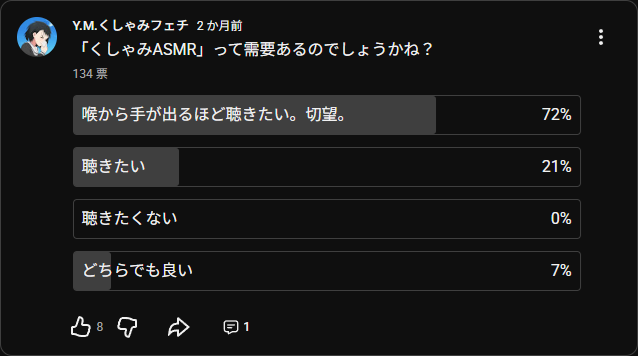
大前提として、私の(くしゃみ専門)チャンネルでアンケートを取っているため、回答者に十分なバイアスがかかっている点にはご留意下さい。
結果を見ると、7割以上の人はくしゃみASMRを切望しているようです。
さらに9割以上の人は聴きたいと回答しています。
これほど望んでいる人がいるなら、今後もくしゃみASMRを出さざるを得ませんよね? そうですよね。
本作への感想
クオリティが非常に高いです。すごすぎます。
ASMRとして癒されるような雰囲気を出しながら、高い頻度でくしゃみを出しています。(30分で30回)
そして、くしゃみはとても豪快です。特に、連続のときには強調されていて大変魅力的です。
実は、バイノーラルマイクで豪快なくしゃみを収録するのは結構難しいのですが、それを一切感じさせないのも賞賛すべき点です。
普通に収録すると、音割れが大きな問題になります。バイノーラルマイクは小さな音をよく拾う繊細なマイクなので、大きな音には弱いんですね。
さらに、くしゃみ以外の雑談も上手です。
「お鼻をこちょこちょ」「ちょっとだけ距離とったりとか」「全然余裕ですけど」
この辺りはASMRとしての完成度が高いと感じます。こういった表現を自然に入れられるのは流石です。
また、本作のコンセプトは「至近距離くしゃみ、時々耳ふー」です。
くしゃみも耳ふーも風を感じられるので、耳ふーによる優しい風と、くしゃみによる激しい風の対比も楽しんでもらえる内容になっています。
これほど“ガチな”くしゃみASMRに出会えることはまずないでしょう。先駆者としてはレベルが高すぎたかもしれません。
やはりプロは凄いです。この質、そして未知のジャンルにも難なく挑戦する行動力。
本作を収録していただいた霧月リルさんには感謝しきれません。
感銘を受けた方も、みな感謝しましょう。
最後に
初めての音声作品の投稿、かつくしゃみASMRという新たなジャンルへの挑戦をしてみました。
普段は切り抜きの投稿をメインとしていますが、たまにはこういうのも良いですよね。
音声作品の投稿、及びそれに関わる動画制作は想像以上に楽しかったので、またやろうと思います。
これもいわゆるクリエイティブ、というものなのでしょうか。まぁ私自身は完全なる裏方ですが。
また引き続き、販売という形式ではなく、YouTube上で誰でも見られる形式で公開する予定なので、興味を持たれた方は気長にお待ちください。
もし、本作のようなくしゃみ音声作品を依頼してほしい活動者がいれば、以下のページから要望を送ってみてください。いつか投稿されるかもしれませんよ。
【要望受付】くしゃみ切り抜き / くしゃみ音声作品依頼
以上です。皆様もよきくしゃみライフ?をお送りください。
それでは、また。

コメント一覧